Lesson 2
Agenda:
Variables
Introduction
Whew. Experimenting with the angles requires you to change three different places (numbers) in the code each time. Imagine you’d want to experiment with all of the squares’ sizes, or with with rectangles! Fortunately there are easier ways to do so than changing lots of numbers every time.
This is where variables come into play: You can tell Python that from now on, whenever you refer to a variable, you actually mean something else. That concept might be familiar from symbolic maths, where you would write: Let x be 5. Then x * 2 will obviously be 10.
In Python syntax, that very statement translates to:
x
=
5
After that statement, if you do print(x), it will actually output its value — 5. Well, can use that for your turtle too:
turtle
.
forward
(
x
)
Variables can store all sorts of things, not just numbers. A typical other thing you want to have stored often is a string - a piece of text. Strings are indicated with a starting and ending " (double quote). You’ll learn about this and other types of data you can store, and what you can do with them later on.
You can even use a variable to refer to the turtle by a name:
timmy
=
turtle
Now every time you type timmy python knows you mean turtle. You can still continue to use turtle as well:
timmy
.
forward
(
50
)
timmy
.
left
(
90
)
turtle
.
forward
(
50
)
A variable called angle
Exercise
If we make a variable called tilt (we could assign it a number of degrees), how could we use that to experiment much faster with our tilted squares program?
Solution
Bonus
Can you apply that principle to the size of the squares, too?
The house of santa claus
Exercise
Draw a house.
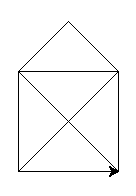
Hint
You can calculate the length of the diagonal line with the Pythagorean theorem. That value is a good candidate to store in a variable. To calculate the square root of a number in Python, you’ll need to import the math module and use the math.sqrt() function. Exponentiating a number is done with the ** operator (so squaring means **2):
import
math
c
=
math
.
sqrt
(
a
**
2
+
b
**
2
)
Introduction
Something you might have noticed: our programs often feature repetition. Python has a powerful concept it makes use of called looping (jargon:iteration), which we can use to cut out our reptitive code! For now,try this easy example:
for
name
in
"John"
,
"Sam"
,
"Jill"
:
print
(
"Hello "
+
name
)
This is incredibly helpful if we want to do something multiple times — say, drawing the individual border lines of a shape — but only want to write that action once. Here’s another version of a loop:
for
i
in
range
(
10
):
print
(
i
)
Notice how we write only one line of code usingi, but it takes on 10 different values?
Therange(n)function can be considered a shorthand for0,1,2,...,n-1. If you want to know more about it, you can use the help in the Python shell by typinghelp(range). Use theqkey to exit the help again.
You can also loop over elements of your choice:
total
=
0
for
i
in
5
,
7
,
11
,
13
:
print
(
i
)
total
=
total
+
i
print
(
total
)
Write this example out and run it with python, to check it works how you might expect.
Note
Notice how above, the lines of code that arelooped, are the ones that areindented. This is an important concept in Python - that’s how it knows which lines should be used in theforloop, and which come after, as part of the rest of your program. Use four spaces (hitting tab) to indent your code.
Sometimes you want to repeat some code a number of times, but don’t care about the value of theivariable; so it can be good practice to replace it with_instead. This signifies that we don’t care about its value, or don’t wish to use it. Here’s a simple example:
for
_
in
range
(
10
):
print
(
"Hello!"
)
You may or may not be wondering about the variablei- why is it used all the time above? Well, it simply stands for “index” and is one of the most common variable names ever found in code. But if you are looping over something other than just numbers, be sure to name it something better! For instance:
for
drink
in
list_of_beverages
:
print
(
"Would you like a "
+
drink
+
"?"
)
This is immediately clearer to understand than if we had usediinstead ofdrink.
Drawing a dashed line
Exercise
Draw a dashed line. You can move the turtle without the turtle drawing its movement by using theturtle.penup()function; to tell it to draw again, useturtle.pendown().

Solution
Show
Bonus
Can you make the dashes become larger as the line progresses?

Hint
Feeling lost? Inspectiat every run of the loop:
for
i
in
range
(
10
):
print
(
i
)
# write more code here
Can you utilizei— commonly called theindexvariable or loop variable — to get increasing step sizes?
Comments
In the example above, the line that starts with a#is called a comment. In Python, anything that goes on a line after#is ignored by the computer. Use comments to explain what your program does, without changing the behaviour for the computer. They can also be used to easily and temporarily disable, or “comment out” some lines of code.
Comments can also go at the end of a line, like this:
turtle
.
left
(
20
)
# tilt our next square slightly
More Efficient Squares
Exercise
The squares we were drawing at the start of this tutorial had a lot of repeated lines of code. Can you write out a square drawing program in fewer lines by utilizing loops?
Solution
Show
Bonus
Trynesting_loops, by putting one right under (_inside) the other, with some drawing code that’s inside both. Here’s what it can look like:
for ...:
    for ...:
        # drawing code inside the inner loop goes here
        ...
    # you can put some code here to move
    # around after!
    ...
Replace the...‘s with your own code, and see if you can come up with something funny or interesting!Mistakes are encouraged!